-
iCagenda
-
iCagenda - English
-
Month navigation on calendar module
Month navigation on calendar module
-
Synopsis
-
 Topic Author
-
Junior Member
-

Less
More
-
Posts: 6
-
Thank you received: 1
-
-
13 years 1 month ago #5113
by Synopsis
Hello,
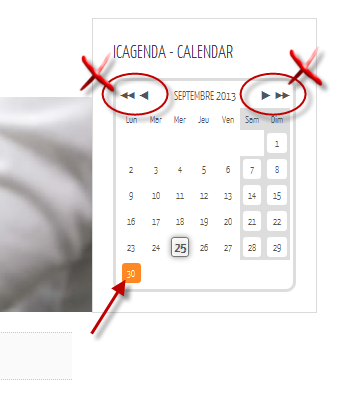
I created 2 events, 1 on september, 1 on october. In calendar module, my september event appears (day highlighted) but no way to navigate on october's month. Arrows <<, <, >, >> have no effect.
Am I missing something ?
Joomla 3.1.5
iCagenda 3.1.13
Firefox 24.0
Please Log in or Create an account to join the conversation.
-
Lyr!C
-

-
Administrator
-

-
Lead Developer
Less
More
-
Posts: 6971
-
Thank you received: 624
-
-
-
-
13 years 1 month ago #5121
by Lyr!C
Does the tooltip is working ?
This can be due to a jQuery conflict.
If you have a link, i can give you a better answer.
If not possible, you can do to things :
- if your site template is having a minimize function for script files, try first to disable it.
- if not, install the plugin jQuery Easy, enable it, and select load jQuery 1.8 from the plugin. (the conflict could be because of an other extension loading before iCagenda a too old version of jQuery, or an extension loading after iCagenda the jQuery Library without controling if already loaded!)
Latest version : iCagenda 4.0.17
Joomla! 4 > Joomla! 6
We recommend every user to keep iCagenda updated.
Support for iCagenda version 3.9 (the final version compatible with Joomla 3) ended on October 13, 2026
Extended security support for the iCagenda PRO 3.9 version until October 13, 2027 (to benefit from this extended support, you must have a Pro subscription: www.joomlic.com/extensions/icagenda)
Don't forget to have your Joomla!® up-to-date!
Do you like iCagenda?
I would appreciate if you could take 5 minutes to post a review on
JED (Joomla Extensions Directory)
.
Please Log in or Create an account to join the conversation.
-
Synopsis
-
Topic Author
-
Junior Member
-
Less
More
-
Posts: 6
-
Thank you received: 1
-
-
13 years 1 month ago - 13 years 1 month ago #5129
by Synopsis
Tooltip works.
JQueryEasy installed. Plugin activated and selected JQuery v1.8 (last version)
Tried activation option :
- JQuery : same problem
- JQuery + JQueryUI : same problem
(Unfortunately, I don't have a link, iCagenda is a feature I try to integrate on our offline local website version)
Thanks,
Last edit: 13 years 1 month ago by Synopsis.
Please Log in or Create an account to join the conversation.
-
Lyr!C
-
-
Administrator
-
-
Lead Developer
Less
More
-
Posts: 6971
-
Thank you received: 624
-
-
-
-
13 years 1 month ago #5131
by Lyr!C
Have a look at the code source generated.
And, if you can copy/paste the header of your page ?
Latest version : iCagenda 4.0.17
Joomla! 4 > Joomla! 6
We recommend every user to keep iCagenda updated.
Support for iCagenda version 3.9 (the final version compatible with Joomla 3) ended on October 13, 2026
Extended security support for the iCagenda PRO 3.9 version until October 13, 2027 (to benefit from this extended support, you must have a Pro subscription: www.joomlic.com/extensions/icagenda)
Don't forget to have your Joomla!® up-to-date!
Do you like iCagenda?
I would appreciate if you could take 5 minutes to post a review on
JED (Joomla Extensions Directory)
.
Please Log in or Create an account to join the conversation.
-
Synopsis
-
Topic Author
-
Junior Member
-
Less
More
-
Posts: 6
-
Thank you received: 1
-
-
13 years 1 month ago #5157
by Synopsis
This is a copy/paste of the header :
<head>
<meta charset="utf-8" />
<meta http-equiv="X-UA-Compatible" content="IE=edge,chrome=1">
<meta name="viewport" content="width=device-width, initial-scale=1">
  <base href="http://localhost/web1102/index.php/competences/formation-lv" />
  <meta name="author" content="AC" />
  <meta name="description" content="Enterprise" />
  <meta name="generator" content="Joomla! - Open Source Content Management" />
  <title>Formation</title>
  <link href="http://localhost/web1102/index.php/competences/formation-lv" rel="canonical" />
  <link href="/web1102/templates/yoo_infinite/favicon.ico" rel="shortcut icon" type="image/vnd.microsoft.icon" />
  <link rel="stylesheet" href="/web1102/plugins/editors/jckeditor/typography/typography2.php" type="text/css" />
  <link rel="stylesheet" href="/web1102/cache/widgetkit/widgetkit-40c7a32b.css" type="text/css" />
  <link rel="stylesheet" href="/web1102/components/com_icagenda/themes/packs/ic_rounded/css/ic_rounded_module.css" type="text/css" />
  <script src="https://ajax.googleapis.com/ajax/libs/jquery/1.8/jquery.min.js" type="text/javascript"></script>
  <script src="/web1102/plugins/system/jqueryeasy/jquerynoconflict.js" type="text/javascript"></script>


  <script src="/web1102/cache/widgetkit/widgetkit-c1c88c8c.js" type="text/javascript"></script>

  <script type="text/javascript">
    (function() {
      var strings = {"MOD_ICCALENDAR_LOADING":"chargement..."};
      if (typeof Joomla == 'undefined') {
        Joomla = {};
        Joomla.JText = strings;
      }
      else {
        Joomla.JText.load(strings);
      }
    })();
  </script>

<link rel="apple-touch-icon-precomposed" href="/web1102/templates/yoo_infinite/apple_touch_icon.png" />
<link rel="stylesheet" href="/web1102/templates/yoo_infinite/css/base.css" />
<link rel="stylesheet" href="/web1102/templates/yoo_infinite/css/layout.css" />
<link rel="stylesheet" href="/web1102/templates/yoo_infinite/css/menus.css" />
<style>.wrapper { max-width: 980px; }
#sidebar-a { width: 25%; }
#maininner { width: 75%; }
#menu .dropdown { width: 250px; }
#menu .columns2 { width: 500px; }
#menu .columns3 { width: 750px; }
#menu .columns4 { width: 1000px; }</style>
<link rel="stylesheet" href="/web1102/templates/yoo_infinite/css/modules.css" />
<link rel="stylesheet" href="/web1102/templates/yoo_infinite/css/tools.css" />
<link rel="stylesheet" href="/web1102/templates/yoo_infinite/css/system.css" />
<link rel="stylesheet" href="/web1102/templates/yoo_infinite/css/extensions.css" />
<link rel="stylesheet" href="/web1102/templates/yoo_infinite/styles/grey/css/custom.css" />
<link rel="stylesheet" href="/web1102/templates/yoo_infinite/css/animation.css" />
<link rel="stylesheet" href="/web1102/templates/yoo_infinite/css/font1/yanonekaffeesatz.css" />
<link rel="stylesheet" href="/web1102/templates/yoo_infinite/css/font2/yanonekaffeesatz.css" />
<link rel="stylesheet" href="/web1102/templates/yoo_infinite/css/font3/yanonekaffeesatz.css" />
<link rel="stylesheet" href="/web1102/templates/yoo_infinite/styles/grey/css/style.css" />
<link rel="stylesheet" href="/web1102/templates/yoo_infinite/css/responsive.css" />
<link rel="stylesheet" href="/web1102/templates/yoo_infinite/css/print.css" />
<link rel="stylesheet" href="/web1102/templates/yoo_infinite/fonts/yanonekaffeesatz.css" />
<script src="/web1102/templates/yoo_infinite/warp/js/warp.js"></script>
<script src="/web1102/templates/yoo_infinite/warp/js/responsive.js"></script>
<script src="/web1102/templates/yoo_infinite/warp/js/accordionmenu.js"></script>
<script src="/web1102/templates/yoo_infinite/warp/js/dropdownmenu.js"></script>
<script src="/web1102/templates/yoo_infinite/js/template.js"></script>
</head>
Please Log in or Create an account to join the conversation.
-
Lyr!C
-
-
Administrator
-
-
Lead Developer
Less
More
-
Posts: 6971
-
Thank you received: 624
-
-
-
-
13 years 1 month ago #5159
by Lyr!C
Hi!
Thanks for the copy/paste.
I think i see the problem: widgetkit! (and/or yootheme)
First, is widgetkit and yootheme are updated ? (as there were issues with old versions...)
Secundly, if yes, the possible issue is due to a compression of css and js files.
Try do disable minimize of css and scripts files.
Latest version : iCagenda 4.0.17
Joomla! 4 > Joomla! 6
We recommend every user to keep iCagenda updated.
Support for iCagenda version 3.9 (the final version compatible with Joomla 3) ended on October 13, 2026
Extended security support for the iCagenda PRO 3.9 version until October 13, 2027 (to benefit from this extended support, you must have a Pro subscription: www.joomlic.com/extensions/icagenda)
Don't forget to have your Joomla!® up-to-date!
Do you like iCagenda?
I would appreciate if you could take 5 minutes to post a review on
JED (Joomla Extensions Directory)
.
Please Log in or Create an account to join the conversation.
-
Synopsis
-
Topic Author
-
Junior Member
-
Less
More
-
Posts: 6
-
Thank you received: 1
-
-
13 years 1 month ago #5178
by Synopsis
I updated WidgetKit from v1.3.5 to last one 1.4.6
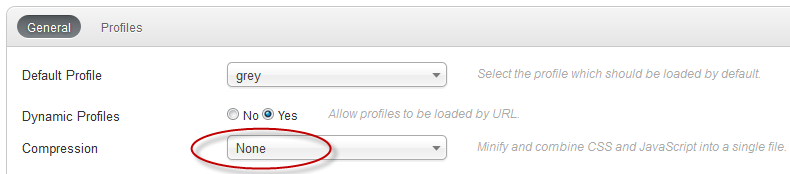
Checked compression in templates' settings : 'None'
Calendar navigation still frozen...
Please Log in or Create an account to join the conversation.
-
Lyr!C
-
-
Administrator
-
-
Lead Developer
Less
More
-
Posts: 6971
-
Thank you received: 624
-
-
-
-
13 years 1 month ago #5191
by Lyr!C
SO, it's maybe a jQuery conflict that could be solved with jQuery Easy plugin. If this one plugin is currently disabled, unabled it!
If still the problem, try to change to beez_20 template to see if it is not due to Yootheme.
Latest version : iCagenda 4.0.17
Joomla! 4 > Joomla! 6
We recommend every user to keep iCagenda updated.
Support for iCagenda version 3.9 (the final version compatible with Joomla 3) ended on October 13, 2026
Extended security support for the iCagenda PRO 3.9 version until October 13, 2027 (to benefit from this extended support, you must have a Pro subscription: www.joomlic.com/extensions/icagenda)
Don't forget to have your Joomla!® up-to-date!
Do you like iCagenda?
I would appreciate if you could take 5 minutes to post a review on
JED (Joomla Extensions Directory)
.
Please Log in or Create an account to join the conversation.
-
Lyr!C
-
-
Administrator
-
-
Lead Developer
Less
More
-
Posts: 6971
-
Thank you received: 624
-
-
-
-
13 years 1 month ago #5192
by Lyr!C
And... is your local website has access to internet connexion ? (as needed to load jQuery Library...)
Latest version : iCagenda 4.0.17
Joomla! 4 > Joomla! 6
We recommend every user to keep iCagenda updated.
Support for iCagenda version 3.9 (the final version compatible with Joomla 3) ended on October 13, 2026
Extended security support for the iCagenda PRO 3.9 version until October 13, 2027 (to benefit from this extended support, you must have a Pro subscription: www.joomlic.com/extensions/icagenda)
Don't forget to have your Joomla!® up-to-date!
Do you like iCagenda?
I would appreciate if you could take 5 minutes to post a review on
JED (Joomla Extensions Directory)
.
Please Log in or Create an account to join the conversation.
-
iCagenda
-
iCagenda - English
-
Month navigation on calendar module
Time to create page: 0.056 seconds