- Posts: 20
- Thank you received: 0
 Topic Author

Please Log in or Create an account to join the conversation.


Please Log in or Create an account to join the conversation.
Topic Author
Please Log in or Create an account to join the conversation.
Date are saved in database as entered so as set to local time of the event.beavachk wrote: Joomla set to my local time time of Brisbane and I have also added a custom php.ini file with the date.timezone = "Australia/Queensland"

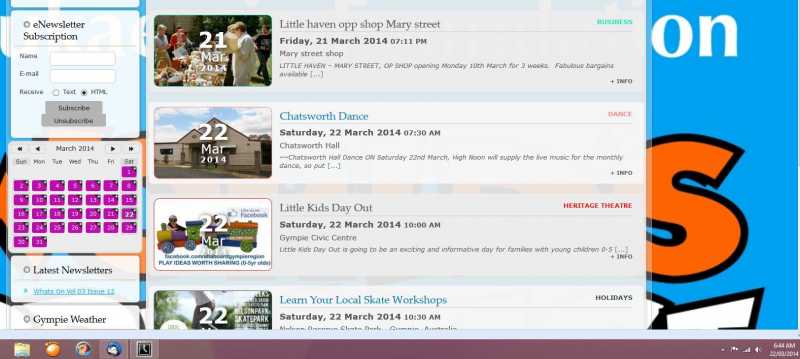
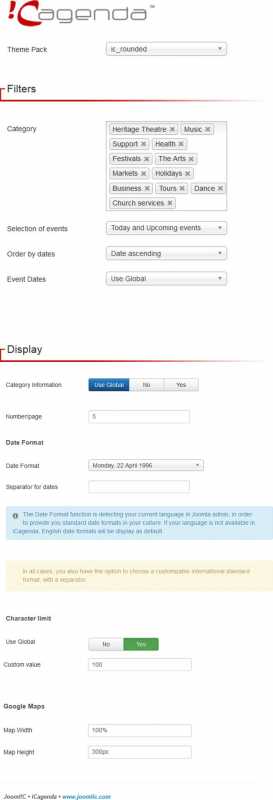
beavachk wrote: Under the Filters setting on the page options, I have set the Selection of events to Upcoming events or Events of the day and upcoming. Don't know what the different is, as it shows the same events.
Thanks
Please Log in or Create an account to join the conversation.

Please Log in or Create an account to join the conversation.
Please Log in or Create an account to join the conversation.
Topic Author
Please Log in or Create an account to join the conversation.
Please Log in or Create an account to join the conversation.
Topic Author
Please Log in or Create an account to join the conversation.
beavachk wrote: Hi,
Many thanks for your response. The attached file is of the settings for the main events page. All the other tabs have default settings. Hope it helps.
Cheers
Please Log in or Create an account to join the conversation.